Package Integration
Allow retailers to synchronize shipment/package data with the ESW Package Service.
ESW Fulfillment Models
ESW offers various fulfillment models for retailers to manage and ship orders. Each model follows a different order process flow:
- Hub Model
- Ship from Store (Hubless)
Hub Model
- In the Hub model, retailers ship goods to an ESW distribution hub.
- From the hub, ESW manages the final delivery to the shopper.
Integration with SFCC
The ESW-SFCC cartridge enables retailers to synchronize their shipment/package data with the ESW Package Service specifically for the Hub model.
Advance Shipping Notification (ASN)
- Retailers must send an ASN of their packages to ESW before the physical packages arrive at the hub
This ensures that ESW can process and route the packages efficiently upon arrival.
Hub Model
A streamlined approach where retailers ship goods to an ESW distribution hub. ESW manages the final delivery to shoppers while integrating seamlessly with SFCC for efficient shipment synchronization.
Retailers send goods to an ESW distribution hub. From this hub, ESW takes responsibility for final delivery to the shopper.
The ESW-SFCC cartridge allows retailers to synchronize shipment and package data with the ESW Package Service, specifically supporting the Hub model.
Retailers must send an ASN to ESW prior to the arrival of packages at the hub, enabling ESW to process and route shipments efficiently.
Sending an Advance Shipping Notification (ASN) to ESW
Retailers can send an Advance Shipping Notification (ASN) to ESW using the eswRetailerPackageFeed job in SFCC.
1️⃣ Job Execution
- The
eswRetailerPackageFeedjob synchronizes package data with the ESW Package Service (EswPackageV4Service). - All packages shipped from the retailer’s hub with real-time shipping data (e.g., tracking number, package reference) are included in the ASN.
2️⃣ ESW Response Handling
- ESW returns an ESW Package Reference in the response.
- SFCC saves this reference at the order level as the ESW Tracking Number.
- The order’s ESW Received ASN? attribute is updated to True.
Syncing an ASN from ESW
The ESW SFCC Cartridge allows retailers to synchronize package information initiated on the ESW portal.
.png&w=1536&q=100)
Syncing an ASN from ESW
How It Works
1️⃣ Order shipped
- The package payload is sent to SFCC.
2️⃣ Package details are saved
Job for ASN Sync
The package information is stored when the eswRetailerPackageFeed job runs.
This job includes a specific step: getASNFromESW – Retrieves ASN data from ESW and syncs it with SFCC.
Viewing ESW Tracking Number
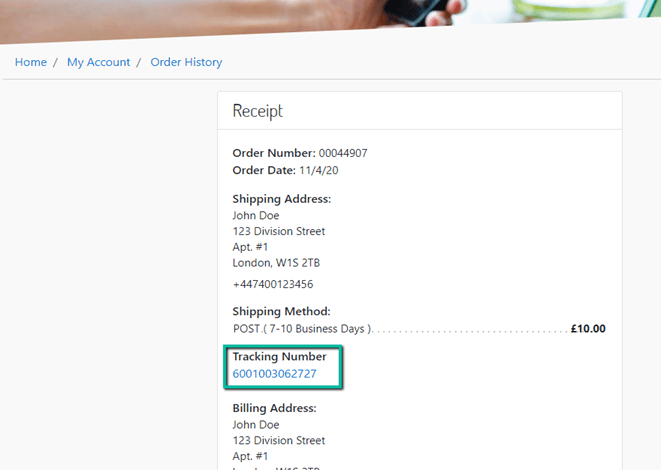
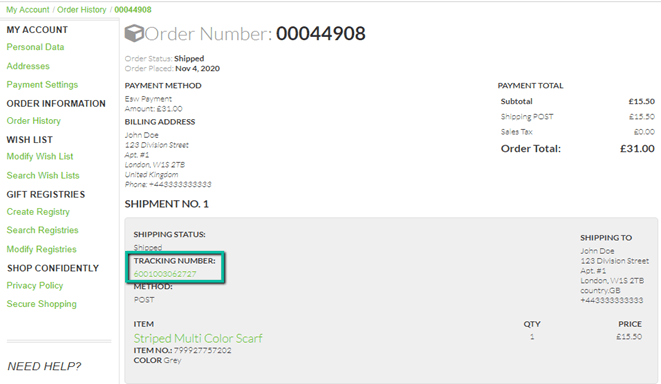
Once the ESW Package Reference is returned by ESW and stored in SFCC as a custom order attribute (labelled ESW Tracking Number), it becomes accessible to registered shoppers.
How Shoppers Can Track Their Order
- Registered users can log in to their account.
- Navigate to the Order History section.
- The ESW Tracking Number is displayed along with the order details.
Viewing ESW Tracking Number