

Checkout Shopper Registration
Enable shoppers to register with your brand or business during Checkout.
The Checkout Shopper Registration feature allows retailers to enable shoppers to create an account during the checkout process, seamlessly registering with your brand or business without leaving the checkout flow.
Benefits
- Build an International Shopper Database: Capture shopper information globally, enabling you to grow a rich customer database for future engagement.
- Personalized Promotions and Discounts: Leverage purchase history to offer tailored promotions and discounts to international shoppers.
- Enhanced Order Tracking: Registered shoppers can easily track their orders via their logged-in dashboard, improving post-purchase visibility.
- Faster Future Checkouts: Stored shopper details speed up the checkout process for returning customers, potentially boosting conversion rates.
How it works
The following flow chart explains the workflow between the ESW-SFCC plugin/cartridge and ESW Checkout.
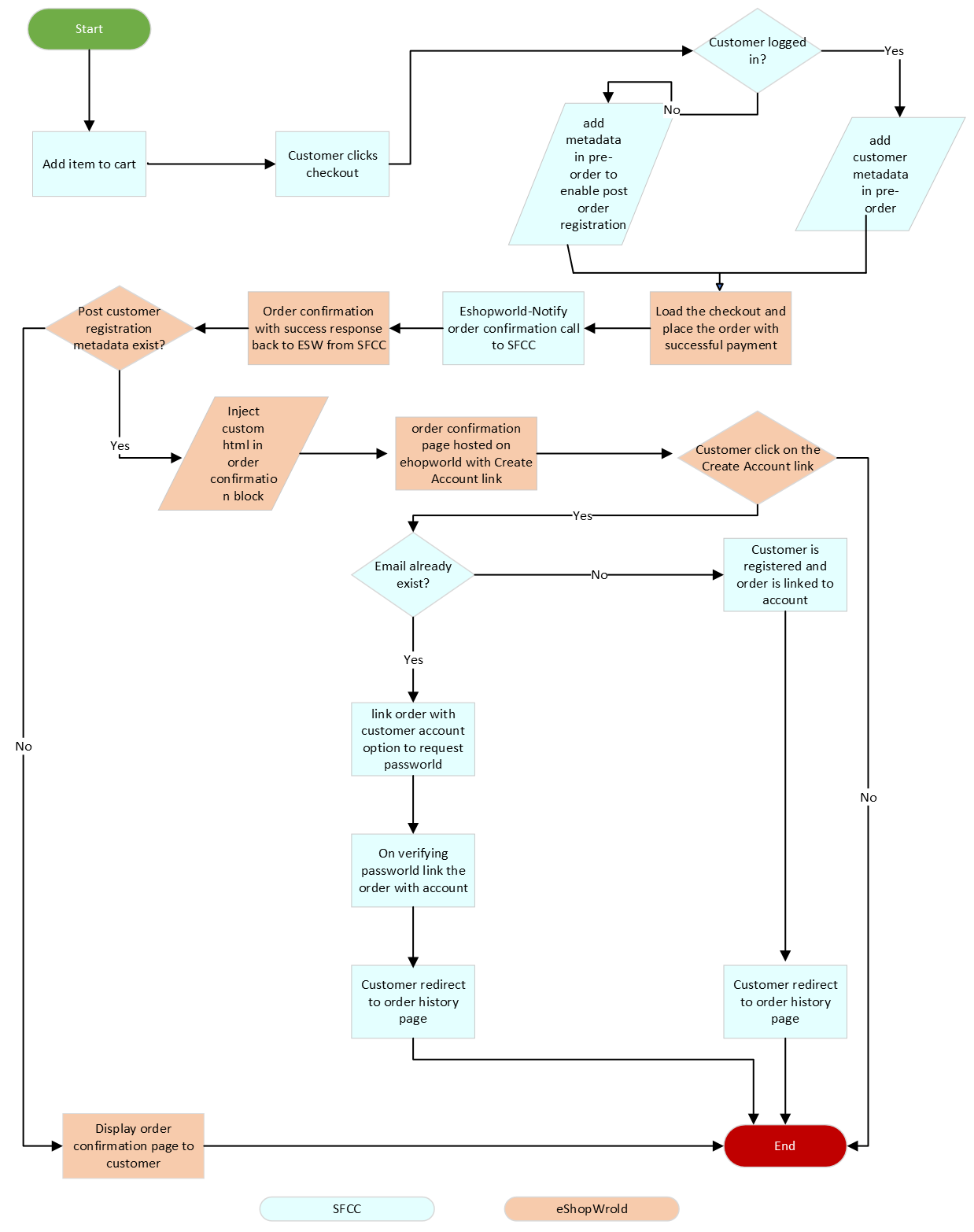
Shopper Adds Item and Initiates Checkout
- The shopper adds an item to the cart and clicks Checkout.
- Authentication Check:
- If the shopper is not logged in, add meta to the pre-order request to enable account registration post-order.
- Store the shopper’s order number in the session to link the order later.
ESW Checkout Order Creation
- ESW loads the checkout and processes payment after receiving confirmation from SFCC.
- Meta-based Behavior:
- If registration meta is present, ESW:
- Injects a shopper registration HTML block on the order confirmation page.
- Displays a Create Account link to the shopper.
- If registration meta is not present, only the standard order confirmation page is shown.
- If registration meta is present, ESW:
Shopper Clicks "Create Account" Link
- On the ESW order confirmation page, when the shopper clicks Create Account:
Case A: Shopper’s Account Already Exists
- Render a login form with the shopper’s email pre-filled.
- Shopper enters their password and submits the form.
- Upon successful verification, link the order with the existing shopper account.
Case B: Shopper’s Account Does Not Exist
- Load an account registration form with:
- Pre-filled order details.
- Password fields for new account creation.
- Shopper enters a password and submits the form.
- SFCC registers a new shopper account and links the order with it.
This flow allows seamless post-order account registration, enhancing shopper experience and ensuring order history linkage.
Session Details for Checkout Shopper Registration
When a guest shopper places an order via ESW Checkout, a session attribute is created to support automatic post-order registration. This ensures that newly placed orders are correctly linked to the newly created user profile.
Session Attribute
Name: confirmedOrderID
Non-Headless Architecture
Session Attribute Creation
- In SiteGenesis and SFRA storefronts,
- The confirmedOrderID session attribute is created during the pre-order request process.
Session Attribute Deletion
- The
confirmedOrderIDsession attribute is deleted once the shopper successfully lands on the Account page after registration.
ESW Checkout Shopper Integration Configuration – Site Preferences
The ESW Checkout Shopper Registration feature can be managed using Custom Site Preferences in SFCC.
Accessing Custom Preferences
Navigate to Merchant Tools → Site Preferences → Custom Preferences → ESW Checkout Configuration
Available Option
- Enable ESW Checkout Shopper Registration
- Purpose: Enables or disables the ability for shoppers to register with your store during the ESW Checkout process.
- Type: Toggle (
Enable / Disable)
Shopper Experience
This section highlights the experience that shoppers have while using this feature.
First-Time Shopper Experience
Shopper Initiates Checkout
- A first-time shopper adds items to the basket and clicks the Checkout button.
Prompt to Register
- On the checkout page, the shopper sees a REGISTER NOW button prompting them to register with your brand.
Redirect to Registration Form
- Clicking REGISTER NOW redirects the shopper to a registration form.
- The shopper is asked to:
- Set and confirm a password
- The email is automatically captured from their checkout information.
Account Creation
- After submitting the form:
- A new account is created for the shopper.
- The account is linked with the email used during checkout.
This flow simplifies account registration for first-time shoppers by using their checkout information to pre-fill registration details.
Repeat/Returning Shopper Experience
Prompt to Register
- Returning shoppers see a REGISTER NOW button prompting them to register with your brand.
Redirect to Registration/Login Form
- Clicking REGISTER NOW redirects the shopper to a login or registration form.
- The shopper is asked to set a password.
- The email is automatically captured from their checkout information.
Account Linking
- After submitting the form:
- If an account already exists with that email:
- The shopper is prompted to log in with their password.
- Upon successful login, the order is linked to the existing account.
- If no account exists:
- A new account is created and linked to the order.
- If an account already exists with that email:
This ensures returning shoppers can quickly log in or register post-purchase without re-entering their email address.
Testing In Sandbox/Staging Environment
Test this feature in a sandbox/staging environment for both use cases.
Create an Order with a New Email
- In the sandbox/staging environment, place an order using a new email address following the ESW checkout flow.
- On the order confirmation page, click the Create Account Registration link.
Place an Order with an Existing Account Email
- Place another order using an existing customer account email.
- On the order confirmation page, click the Create Account Registration link.
Verify Pre-Order Metadata
- Confirm that the
Registration-Account-URLlink is included in the pre-order request. - This can be verified via network inspection or logs.
- Example environment:
zyfl-005.sandbox.us01.dx.commercecloud.salesforce.com
Review that the Registration-Account-URL link exists in the pre-ordered request, as seen below for zyfl-005.sandbox.us01.dx.commercecloud.salesforce.com domain.
Test New Email Flow
- When redirected to the ESW order confirmation page with a new email:
- Click Create Account.
- You should be redirected to the registration form page with pre-filled fields.
Test Existing Account Email Flow
- When redirected to the ESW order confirmation page with an existing account email:
- Click Create Account.
- You should be redirected to the login form page with the pre-filled email.
Validate Account and Order Sync
- After submitting the registration or login form successfully:
- You should be redirected to your account.
- The order should be linked and visible under the newly created or existing customer account.
Testing both new and existing email flows ensures that post-purchase account creation and order linking work correctly in non-production environments.